
An idea, a text, a reminder
Reply to SMS
Stay in your ReminderStream text conversation. Send an event, check the details, and confirm when you’re ready to save.
See the conversation ↓Send. Review. Save.
Send the event
Include what it is, a date and, if needed, a time. Specific dates with a year are clearest. We use your account time zone.
Check the preview
Review the title, actual date, time and time zone. If no time is found, reply 8 when offered to make it all-day. That does not save it yet.
Confirm with 9
Reply 9 to the save preview, then look for “Saved” or “Already exists.” Open My Reminders if you want to check the event.
“Pedicures with Gramma next Saturday”
This real conversation was completed on October 24, 2026. “Next Saturday” became October 31. Check the date shown for your own message: relative dates can be ambiguous.
- YouCreate a reminder for pedicures with gramma for next Saturday.
- ReminderStreamNo time: Pedicures with Gramma 2026-10-31 8 All-day; 0 Cancel; or resend one complete event with date and time. Nothing saved.
- You8
- ReminderStreamSave: Pedicures with Gramma 2026-10-31 All day America/Chicago 9 Save; 0 Cancel. STOP stops texts.
- You9
- ReminderStreamSaved. Your usual reminder schedule applies. Open My Reminders to see your event.
Reading this guide sends no messages and creates no events.
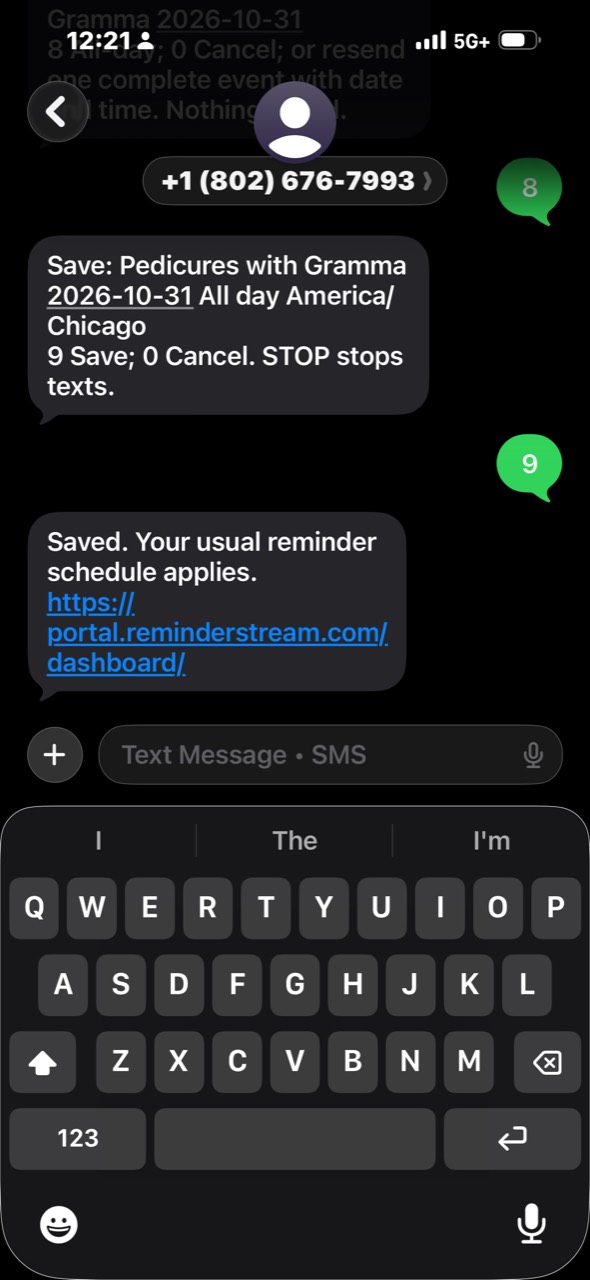
Shared with permission. Tap the image to view it full size.
Follow the latest prompt
- 8 · All-day
- When offered after a missing time, chooses all-day and shows a new preview. Review it, then reply 9 to save.
- 9 · Save, when asked
- Confirms the event or timing just shown. In a selection list, 9 can mean More instead.
- 0 · Exit the current flow
- Leaves an event draft without saving. In a timing menu, it can go back a step. It does not stop all texts.
- 1 · Acknowledge a recent reminder
- From the main menu, completes an unchanged recent event and stops its remaining reminders. If several match, choose from the list. Inside another menu, follow that menu’s numbered choices.
- 2 or SCHEDULE · Reminder timing
- From the main menu, opens account schedule options. If you have contact-specific schedules, use the Settings link provided.
- HELP / STOP / START
- HELP requests service instructions. STOP stops texts to that number. START can resume only when verification, consent and account settings allow it. These commands do not delete your events.
Before you rely on it
- A request or preview is not a saved event. Confirm the preview and check the response. If a save cannot be confirmed, check My Reminders before trying again.
- If the date is unclear, send one complete event with a specific date. If several events are found, choose one to review.
- Menus and drafts expire after 15 minutes. Finish or exit the current flow before starting another.
- Free text starts a new-event flow. “Move this to Friday” does not automatically edit the reminder you last received. Edit existing dates and details on the website, or use our separate email reply guide.
- Your account shares 60 SMS per rolling 30 days, including verification, service replies and reserved send attempts. Carrier charges may apply. If texting is unavailable or the allowance is reached, use the website.
- Duplicate checks and the three-events-per-local-date limit still apply. Saving an event does not bypass delivery settings, quiet hours or SMS eligibility.